
Why do you need Google Map Pack Seo for your business? If you want more customers to find your local business, you need to focus on Local SEO. One of the most powerful tools in local search is the Google Map Pack—also known as the Google Local Pack or Google 3-Pack.
Ranking in this section can instantly boost your visibility, bring in more calls, and increase walk-in traffic.
In this guide, you’ll learn everything about the Google Map Pack, why it’s important for your business, how it works, and the exact steps to rank higher.
What Is the Google Map Pack? (Simple Explanation)
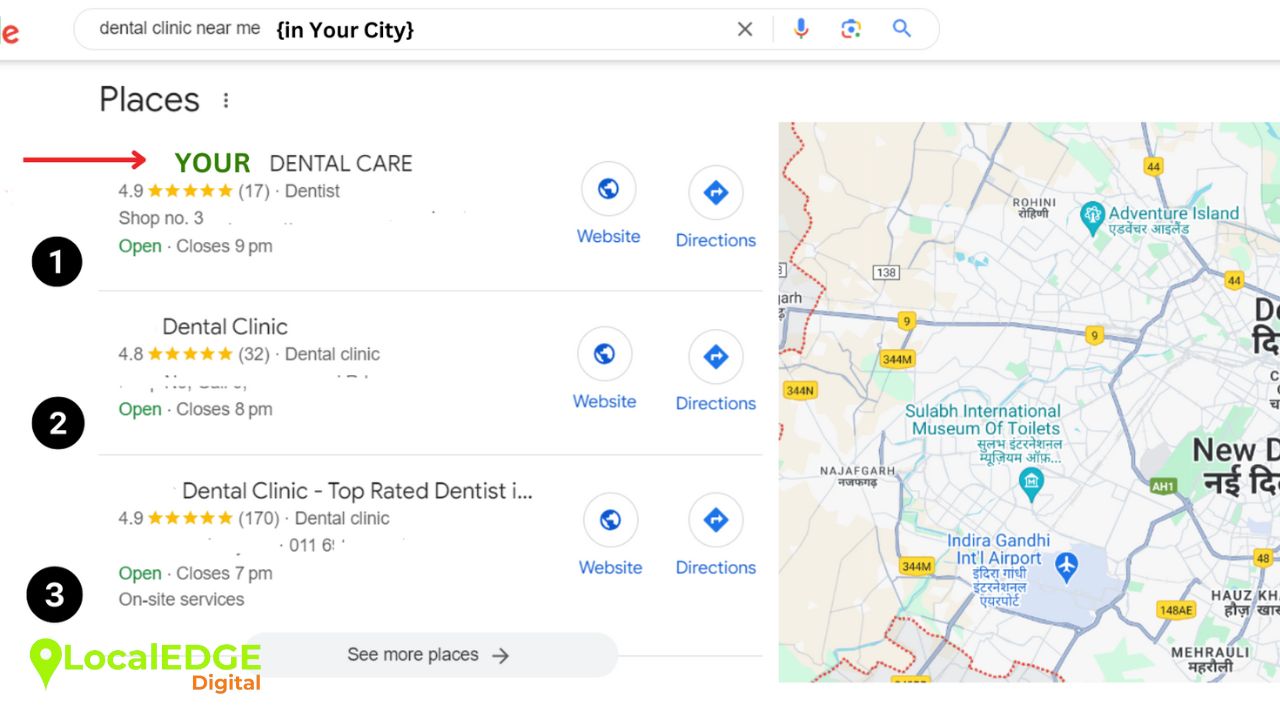
When someone searches for a local business—like “best restaurant near me”, “top restaurants in Chicago”, or “digital marketing agency in Delhi”—Google displays a special box at the top of the results.
- This box contains:
- The top 3 local businesses
- Star ratings from Google Reviews
- Address and contact details
- Opening hours
- A short review snippet
- A map showing business locations
These result listings are called the Google Map Pack or Google Local 3-Pack.
Because this section appears above all other organic results, businesses in the Map Pack get more:
- Clicks
- Calls
- Website visits
- Directions requests
- Foot traffic
Why the Google Map Pack Matters for Local Businesses
The Google Local Pack is extremely powerful because:
The #1 Map Pack result gets 17.6% CTR
The #2 and #3 results get 15.4% and 15.1% CTR
After this, clicks drop sharply
It means businesses appearing in these top three positions capture the majority of local customer interest—especially from people who are ready to buy.
The Map Pack helps you:
- Build trust
- Increase conversions
- Boost visibility, especially on mobile
- Attract customers actively looking for your services
This is why Map Pack SEO is essential for any business serving local customers.
Google Map Pack vs Organic SEO
Both are important, but they work differently:
| Feature | Google Map Pack | Organic SEO |
|---|---|---|
| Appears at the top | ✔ Yes | ❌ No |
| Shows local businesses | ✔ Yes | ✔ Sometimes |
| Ranking factors | Reviews, proximity, GBP | On-site SEO, content, backlinks |
| Best for | Local intent searches | General/Informational searches |
Organic SEO helps long-term growth, while Google Map Pack SEO helps you capture customers ready to take action now.
How to Rank in the Google Map Pack (Step-by-Step Guide)
Below is the improved, detailed, SEO-rich step-by-step framework you requested.
Step 1: Set Up and Verify Your Google Business Profile (GBP)
Your Google Business Profile is the foundation of your local SEO. Without it, you cannot appear in Google Maps or the Local Pack.
What to do:
Go to the Google Business Profile website
Enter your business name, category, and location
Verify through postcard, phone, email, or video
Why does it help SEO?
A verified GBP builds trust and signals to Google that your business is real, active, and eligible to appear for “near me” searches.
Step 2: Fully Complete Your Google Business Profile
Google rewards businesses that share complete and accurate information.
What to fill:
Business categories
Opening hours
Phone number & website
Services & products
Photos & videos
Business description with local keywords
Why it matters:
A completed profile gives Google more understanding of your business and increases your chance of ranking higher in the Google Map Pack.
Step 3: Collect More Google Reviews (And Respond to Them)
Reviews directly influence your ranking in the Local Pack.
How to get more reviews:
Share your review link
Ask customers after the service
Use WhatsApp/email reminders
Add “Review Us” prompts on receipts
Why does it help SEO?
Google prefers businesses with high ratings and consistent new reviews. Responding to reviews shows engagement and improves trust.
Step 4: Fix Local Citations and Ensure NAP Consistency
Local citations are mentions of your business across other websites.
Your NAP (Name, Address, Phone) must match everywhere:
JustDial
IndiaMart
Yelp
Yellow Pages
Business directories
Why does it help SEO?
When all details match, Google trusts your business more. Inconsistent information can push your listing out of the Local Pack rotation.
Step 5: Create Local Landing Pages on Your Website
Your website must support your local SEO efforts.
What to create:
City-specific pages
Service area pages
Google Map embed
Schema markup
Local keywords & service info
Example:
“Salon in Lajpat Nagar Delhi”
“Best digital marketing agency in Mumbai Bandra”
Why does it help SEO?
These pages give Google strong signals about your location and services, supporting better Map Pack visibility.
Step 6: Build Local Backlinks (High-Quality Only)
Backlinks from trusted local sources boost authority.
How to get local backlinks:
Guest posts on local blogs
Sponsor local events
Collaborate with influencers
Join local business associations
Press releases on local news sites
Why does it help SEO?
Google ranks businesses higher when local, trustworthy websites link to them.
Step 7: Track Your Google Map Pack Rankings
Tracking helps you understand:
Where you rank
Where visibility drops
Which areas need optimisation
Tools for tracking:
BrightLocal GeoGrid
Local Falcon
Map Pack Magic
Why it matters:
These tools show which parts of your city see your business in the top 3 positions.
- Advanced Strategies to Dominate the Google Map Pack
- Use Google Posts Frequently
- Share updates, offers, events, and blogs with CTAs.
- Add a Q&A Section in Your GBP
- Answer common customer questions directly.
- Use Google Maps Ads
- Display ads directly in the Map Pack for faster visibility.
- Optimize for Service Area Businesses (SABs)
Even without a physical address, SABs can rank if properly optimized.
How to Measure Google Map Pack Performance?
Use:
GBP Insights
Semrush
Ahrefs
Moz Local
Track:
Calls
Direction requests
Website clicks
Local keyword rankings
Customer actions
This helps you understand what’s working and where to improve.
FAQs About Google Map Pack SEO
1. What is the Google Map Pack?
It’s the top 3 local business listings shown on Google with map markers, ratings, and key details.
2. How do I get my business into the Map Pack?
Optimize your Google Business Profile, get reviews, improve citations, build backlinks, and optimize your website for local SEO.
3. What factors affect Map Pack rankings?
Reviews & ratings
Local citations
Backlinks
On-site SEO
Proximity to the user
4. Can businesses without a physical address rank?
Yes. Service-area businesses can hide their address and still rank.
5. Do reviews affect Map Pack rankings?
Absolutely. Positive reviews help you rank higher and attract more clicks.
Win More Local Customers with Google Map Pack SEO
Remember, ranking in the Google Map Pack can dramatically improve your local visibility, credibility, and customer conversions.
By optimizing your Google Business Profile, collecting reviews, fixing citations, improving local SEO, and tracking your results, you can stay ahead of competitors and dominate local searches.
Want to win over competitors? Contact us now